How to Start the 14 Days Journey to Better Rankings If I Already Have the Plugin Installed?
New in Version 14+
Important: This video presents the most recent version of the tool. Some details in this article may differ, so please use the video as the most up-to-date reference.
Please note: The version shown in this video is v14+. Because some of our support and Help Center articles were created before, certain wording, screenshots, features, or instructions in the article may differ from what you see in the video. When differences occur, please refer to the video for the most up-to-date version of the tool.
If you already have Squirrly SEO installed inside your WordPress and you want to be able to increase ALL your rankings on the Google Search Engine, here’s how to start the Journey to Better Rankings.
Go to Squirrly SEO > Home > scroll down to the section: 14 Days Journey Course
There you will see the 14 Recipes you need to follow. They will lead you to that desired first page of Google search.
Click on each of the recipes to open them. Once you complete the journey (go through all the 14 recipes) you can click on I’m all done. Hide this block, and the section with the 14 Days Journey will NO longer appear in your Overview.


IMPORTANT NOTE!
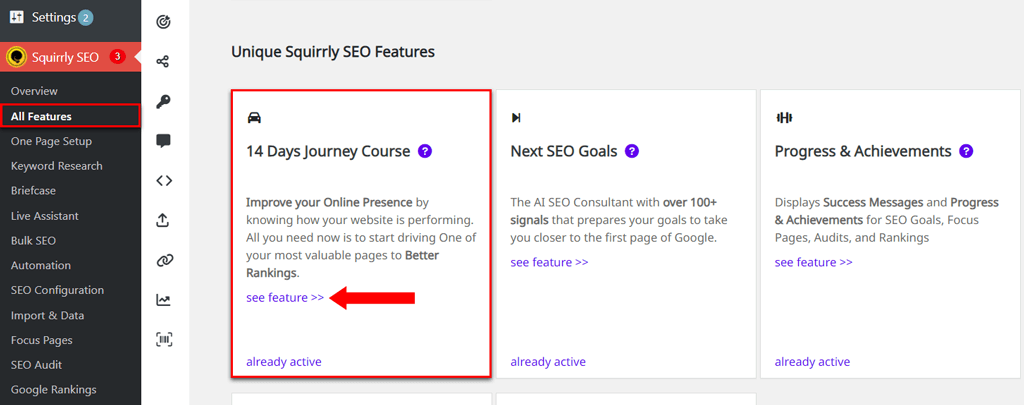
You can also reach the section with the 14 Days Journey to Better Rankings by navigating to: Squirrly SEO > All Features > 14 Days Journey to Better Rankings and clicking on see feature >> (as shown in the screenshot below).