
Testing the Squirrly abilities
What you are testing
Five layers sit between your WordPress database and an AI assistant. Each step below proves exactly one of them, in order, so a failure points at a single cause rather than the whole stack.
- Squirrly registers its abilities in WordPress.
- They execute, and the permission gate refuses users who should be refused.
- They are reachable over the REST API with an Application Password.
- They are visible to an MCP client.
- An assistant can read and write real SEO data.
Steps 1 to 4 need nothing but WordPress and WP-CLI. If you only want to script Squirrly rather than connect an AI tool, you can stop after step 4.
Before you start
| Requirement | Notes |
|---|---|
| WordPress 6.9+ | The Abilities API is core from 6.9. Check with wp core version. |
| WP-CLI | Used for every verification step here. |
| PHP 7.4+ | Required by the MCP Adapter that Squirrly includes, from step 5 onward. Squirrly itself still runs on PHP 7.0. |
| HTTPS | WordPress only offers Application Passwords over https://. See the local development note in step 3. |
Tooling note
WordPress core does not ship a wp ability command. The Abilities API in core is PHP and REST only. Use wp eval for the early steps, and the MCP Adapter’s own wp mcp-adapter commands from step 5.
1. Confirm the abilities are registered and visible
Proves: the plugin loaded, registered, and marked its abilities so an MCP client can see them. Runs entirely inside WordPress, no HTTP, no auth.
Registered and visible are two different things. An MCP client only lists an ability whose metadata sets a nested mcp.public flag. An ability missing that flag still works over REST and WP-CLI, so it looks healthy everywhere except where it matters. Check both.
wp eval '
$sq = array_filter( wp_get_abilities(), function ( $a ) {
    return strpos( $a->get_name(), "squirrly/" ) === 0;
} );
foreach ( $sq as $a ) {
    $m = $a->get_meta();
    printf( "%-40s %s\n", $a->get_name(),
        ( $m["mcp"]["public"] ?? false ) ? "visible" : "HIDDEN" );
}
echo "total: " . count( $sq ) . "\n";
'
Expected:
squirrly/get-seo                         visible
squirrly/update-seo                      visible
squirrly/get-patterns                    visible
squirrly/get-settings                    visible
squirrly/update-settings                 visible
squirrly/get-briefcase                   visible
squirrly/get-ranks                       visible
squirrly/get-focus-pages                 visible
squirrly/get-keyword-research-history    visible
squirrly/get-live-assistant-tasks        visible
squirrly/add-briefcase-keyword           visible
squirrly/assign-keyword                  visible
squirrly/add-focus-page                  visible
squirrly/recheck-focus-page              visible
squirrly/add-audit-page                  visible
squirrly/request-audit                   visible
total: 16
total: 0 means the Abilities API is not present. Check that wp core version reports 6.9 or higher.
Any line reading HIDDEN means the ability is not published to MCP clients. Update Squirrly to the latest version. Everything from step 5 onward will silently find nothing until you do.
2. Execute one, then check the permission gate
Proves: the abilities return real data, and low-privilege users are refused.
wp eval '
$admin = get_users( array( "role" => "administrator", "number" => 1 ) );
wp_set_current_user( $admin[0]->ID );
$r = wp_get_ability( "squirrly/get-seo" )->execute( array( "post_id" => 1 ) );
echo is_wp_error( $r ) ? "ERROR: " . $r->get_error_code() . "\n"
                       : wp_json_encode( $r["seo"] ) . "\n";
'
Swap post_id for a real post. You should get a JSON object of stored SEO fields. Now confirm the gate that protects you once an AI tool is connected. Create a throwaway subscriber, check it is refused, delete it:
UID=$(wp user create abilitytest abilitytest@example.invalid \
        --role=subscriber --porcelain)

wp eval "
wp_set_current_user( $UID );
\$r = wp_get_ability( 'squirrly/update-seo' )->execute(
    array( 'post_id' => 1, 'seo' => array( 'title' => 'nope' ) )
);
echo is_wp_error( \$r ) ? 'DENIED: ' . \$r->get_error_code() . \"\n\"
                        : \"ALLOWED, which is a bug\n\";
"

wp user delete $UID --yes
Expected: DENIED: ability_invalid_permissions
A Contributor is worth testing too, because the rule is subtler. A Contributor may edit the SEO of its own posts only while they are drafts, and is refused once the post is published.
3. Create an Application Password
Proves nothing on its own. This is the credential every HTTP step below needs.
wp user application-password create admin dev-testing --porcelainCopy the value it prints, spaces included. This is the only time it is shown.
Local development over http
WordPress hides Application Passwords on sites that are not served over HTTPS, so the command above fails on a plain http:// dev site. For local testing only, drop this in wp-content/mu-plugins/dev-apppass.php:
<?php add_filter( 'wp_is_application_passwords_available', '__return_true' );Delete the file when you are done. Never do this on a production or public site, because it sends credentials in clear text on every request.
To clean up afterwards: wp user application-password delete admin --all
4. Test over the REST API
Proves: layers 1 to 3. The fastest end-to-end check, and it needs no MCP plugin at all.
AUTH='admin:xxxx xxxx xxxx xxxx xxxx xxxx'
SITE='https://yoursite.com'
Discovery
curl -s -u "$AUTH" "$SITE/wp-json/wp-abilities/v1/abilities" \
  | grep -o '"squirrly/[a-z-]*"'
Read
Read-only abilities must use GET, with parameters in input[...] bracket notation. Quote the URL, or your shell eats the square brackets and the request arrives with no input at all.
curl -s -u "$AUTH" \
  "$SITE/wp-json/wp-abilities/v1/abilities/squirrly/get-seo/run?input%5Bpost_id%5D=42"
If this returns 404 while writes succeed, a security plugin is blocking query strings on the REST API. That breaks every read-only ability over REST, and leaves MCP unaffected.
Write
Write abilities must use POST, with the parameters wrapped in an input object.
curl -s -u "$AUTH" -X POST \
  -H 'Content-Type: application/json' \
  -d '{"input":{"post_id":42,"seo":{"title":"REST test title"}}}' \
  "$SITE/wp-json/wp-abilities/v1/abilities/squirrly/update-seo/run"
A successful write returns {"saved":true, ...}. The real test is not the API response though, it is the rendered HTML:
curl -s "$SITE/your-post-slug/" | grep -o '<title>[^<]*</title>'You should see REST test title. Set the title back to "" the same way when you are finished.
Why two conventions
Both rules come from WordPress core, not from Squirrly. Sending POST to a read-only ability returns 405 Read-only abilities require GET method. Putting parameters at the top level instead of inside input returns 400 input is not of type object.
5. Turn on the MCP connection
Proves nothing yet. Squirrly includes the MCP Adapter, the component that publishes the abilities to AI clients, so there is no plugin to install. If another plugin already loads a copy, Squirrly uses that one.
Turn on Allow AI assistants to connect with a sign-in in Squirrly SEO, Technical SEO, Connect Tools, AI Tools, then check that the adapter is running:
wp mcp-adapter listExpected:
ID                          Name                        Version  Tools  Resources  Prompts
mcp-adapter-default-server  MCP Adapter Default Server  v1.0.0   3      0          0
Three tools is correct
The default server does not publish each ability as its own tool. It publishes three meta-tools, mcp-adapter-discover-abilities, mcp-adapter-get-ability-info and mcp-adapter-execute-ability, and the AI client uses those to find and run everything else.
If you have turned on the AI Tools switch in Squirrly, a second server named mcp-oauth-server appears alongside it. That one adds the sign-in used by web-based assistants. It publishes the same three meta-tools.
6. Test MCP locally over STDIO
Proves: layer 4, with no network and no authentication in the way.
echo '{"jsonrpc":"2.0","id":1,"method":"tools/call","params":{
  "name":"mcp-adapter-discover-abilities","arguments":{}}}' \
| wp mcp-adapter serve --user=admin --server=mcp-adapter-default-server
The response lists every visible ability with its description. Confirm all sixteen squirrly/* entries are there. If they are missing but step 1 passed, check that the AI Tools switch is on and that Squirrly is up to date.
Now execute one. Note the argument names: ability_name and parameters, not name and input.
echo '{"jsonrpc":"2.0","id":2,"method":"tools/call","params":{
  "name":"mcp-adapter-execute-ability",
  "arguments":{"ability_name":"squirrly/get-seo",
               "parameters":{"post_id":42}}}}' \
| wp mcp-adapter serve --user=admin --server=mcp-adapter-default-server
Look for "success":true and a data object holding target, url, seo and computed. Getting the argument names wrong returns "Ability name is required".
7. Test MCP over HTTP
Proves: the full chain a real client uses. HTTPS, credential, session, adapter, abilities.
Every request after initialize must carry the session ID that initialize returns in a response header. This is the single most common cause of confusing errors.
SERVER="$SITE/wp-json/mcp/mcp-adapter-default-server"

SID=$(curl -s -D - -o /dev/null -u "$AUTH" -X POST "$SERVER" \
  -H 'Content-Type: application/json' \
  -H 'Accept: application/json, text/event-stream' \
  -d '{"jsonrpc":"2.0","id":1,"method":"initialize","params":{
       "protocolVersion":"2025-11-25","capabilities":{},
       "clientInfo":{"name":"curl","version":"1"}}}' \
  | grep -i '^mcp-session-id:' | tr -d '\r' | awk '{print $2}')

curl -s -u "$AUTH" -X POST "$SERVER" \
  -H 'Content-Type: application/json' \
  -H 'Accept: application/json, text/event-stream' \
  -H "Mcp-Session-Id: $SID" \
  -d '{"jsonrpc":"2.0","id":2,"method":"tools/call","params":{
       "name":"mcp-adapter-discover-abilities","arguments":{}}}' \
  | grep -o '"squirrly/[a-z-]*"' | sort -u
Expected:
"squirrly/get-briefcase"
"squirrly/get-focus-pages"
"squirrly/get-keyword-research-history"
"squirrly/get-live-assistant-tasks"
"squirrly/get-patterns"
"squirrly/get-ranks"
"squirrly/get-seo"
"squirrly/get-settings"
"squirrly/update-seo"
"squirrly/update-settings"
8. Connect an assistant
Proves: layer 5. Two routes, depending on where the assistant runs.
Claude Desktop, Claude Code, or another local client
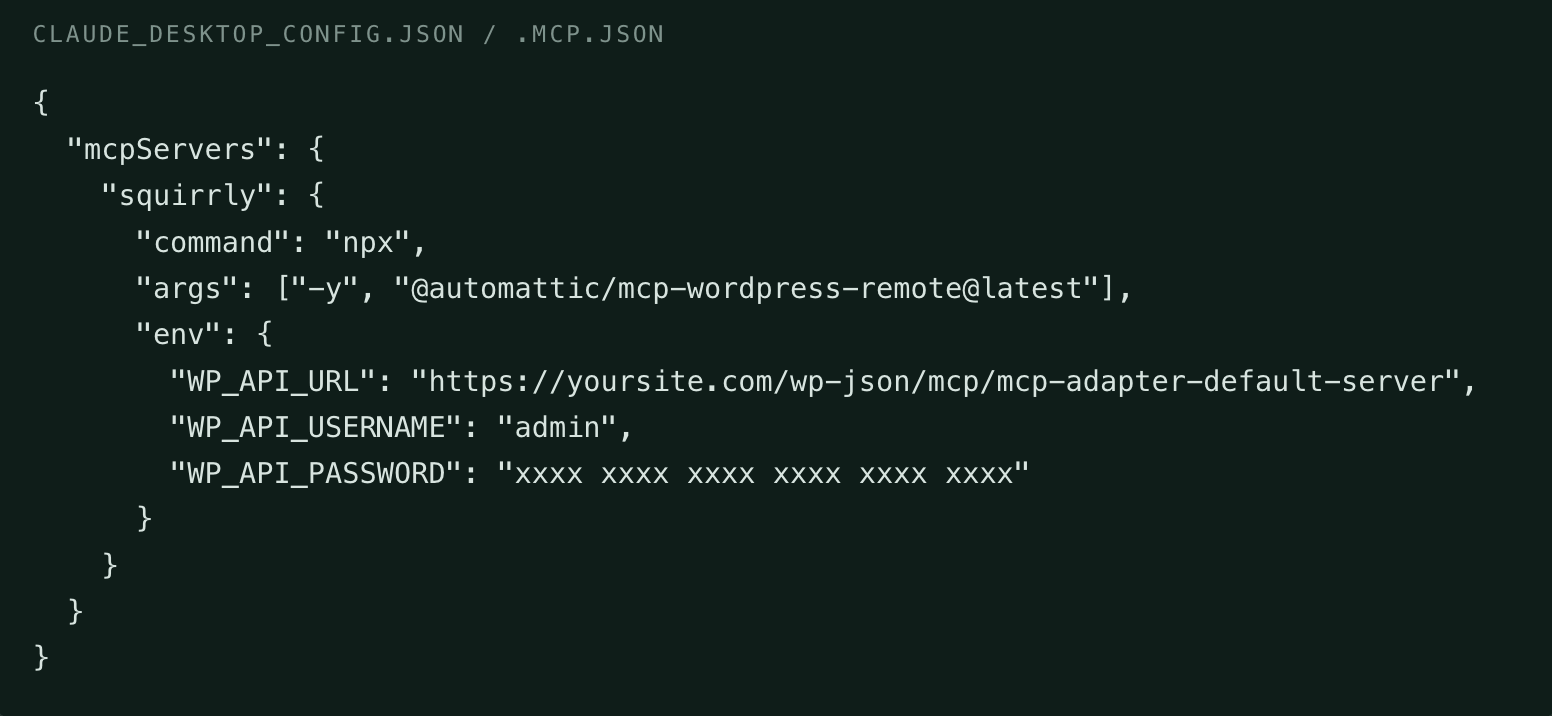
Add a bridge that runs on your machine, holds the Application Password, and signs each request:
{
  "mcpServers": {
    "squirrly": {
      "command": "npx",
      "args": ["-y", "@automattic/mcp-wordpress-remote@latest"],
      "env": {
        "WP_API_URL": "https://yoursite.com/wp-json/mcp/mcp-adapter-default-server",
        "WP_API_USERNAME": "admin",
        "WP_API_PASSWORD": "xxxx xxxx xxxx xxxx xxxx xxxx"
      }
    }
  }
}
Claude Desktop reads claude_desktop_config.json. Claude Code uses .mcp.json in the project, or claude mcp add. Restart the app after saving.
Claude on the web, or OpenAI Codex
Turn on the switch in Squirrly SEO, Technical SEO, Connect Tools, AI Tools, copy the address it shows, and paste it into Add custom connector. Approve the request on your own WordPress login screen.
The address is https://yoursite.com/wp-json/mcp/mcp-oauth-server, not the default server. No Application Password is needed: approving the request creates one for you, which you can revoke from your profile.
Verify a real round trip
Ask the assistant, in order:
- List the Squirrly tools you have. It should name all ten.
- What is the SEO title and meta description of post 42? Compare against step 4.
- Which Automation pattern produces that title? It should name the pattern rather than guess.
- Change the SEO title of post 42 to “round trip test”.
- Confirm in two places: the Squirrly snippet editor in wp-admin, and the rendered page source.
If the change shows in the page <title>, the integration works end to end. Set the title back, then run wp user application-password delete admin --all.
Troubleshooting
Grouped by the exact string you will see.
total: 0 in step 1
WordPress is older than 6.9, so there is no Abilities API. Squirrly works normally, this feature is simply unavailable.
HIDDEN in step 1, or no squirrly/* tools in step 6
Update Squirrly to the latest version. Older copies wrote the visibility flag where no MCP client reads it, which is invisible over REST and hides the abilities from every MCP client.
Authorization with the MCP server failed
The AI Tools switch is off, or your server is not serving the two sign-in addresses. The AI Tools screen checks both and shows what to change.
Unknown OAuth client
The assistant is not on the allowlist. Claude and OpenAI Codex are allowed by default. Add others with the sq_mcp_trusted_publishers filter.
401 Unauthorized on any REST or MCP HTTP call
Usually one of three things. The site is not on HTTPS, so Application Passwords are unavailable. The server strips the Authorization header, which is common on Apache with CGI or FastCGI and is fixed by passing it through in your vhost config. Or a security plugin is blocking REST requests.
404 on reads while writes succeed
A security plugin is blocking query strings on the REST API. Read-only abilities need GET with input[...], so they fail while POST writes still work. Allow the wp-abilities/v1 namespace. MCP connections are not affected.
-32600 Missing Mcp-Session-Id header
Every request after initialize must include the session ID. See step 7.
405 Read-only abilities require GET method
You sent POST to a read ability. Reads use GET with input[...] in the query string.
400 input is not of type object
You put the parameters at the top level of a POST body. Wrap them in input.
Ability name is required
From mcp-adapter-execute-ability. The arguments are ability_name and parameters, not name and input.
Site not connected to Squirrly Cloud
The Briefcase, ranking, Focus Page, keyword research and Live Assistant abilities read data from Squirrly Cloud. Connect the site from the Squirrly dashboard. Page SEO, settings and Automation patterns work either way.
Cloud data looks stale
Cloud responses are cached for five minutes so that an agent iterating over many pages does not flood the connection.
Testing safely
Squirrly’s per-page SEO lives in its own qss table rather than in post meta, so a normal post revision will not undo an ability write. Before testing writes on a site with real data, snapshot the row:
wp db query "SELECT seo FROM $(wp db prefix)qss WHERE url_hash = MD5('42')"Three behaviours are worth knowing before you point an agent at a live site.
update-seois a partial update, so omitted fields keep their stored value. The exception isjsonld_types, which is a replacement list. Leaving a type out of it removes that schema’s stored data.get-seoreturnsseoandcomputedseparately.seois what is stored.computedis what the page currently outputs, with asourceblock naming the Automation pattern behind it. Writing acomputedvalue back converts an inherited Automation setting into a fixed value for that page, so only do it on purpose.- A post type with no Automation pattern of its own inherits the shared
custompattern. Editing that pattern changes every other post type in the same position, so checksourcebefore you change it.
Connect a dedicated WordPress user at the lowest role that fits the job rather than an administrator account. An Editor can update the SEO of posts it can edit but cannot change site-wide settings.


0 Comments